
Field Definitions
This section provides a sample javascript object literal (JSON Object) for each of the different supported field types.
Please review the Form Definition File section to review the entire structure for a form's complete definition. You can copy and paste individual field objects into your own formData.json file and modify the values to meet your needs. Key value pairs in red are optional. Items to be modified are in blue. All others are required.
Text Fields

{
"Label":"Text Field",
"FieldDataID":"textFldID",
"width": 300,
"Type":"text",
"Placeholder": "Enter any text",
"required" : 1
}
Notes:
- You might consider a RegEx expression in a Pattern field for better match criteria for supported browsers. This would require adding the optional "Pattern":"some regex",. If no pattern is required, omit the Pattern key value pair.
- FieldDataID must be unique for each field on form
- "required" value is 1 if you require this field. If this key-value pair is omitted, the field will not be required.
Textarea
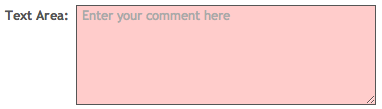
{
"Label":"Text Area",
"FieldDataID":"TextAreaFldID",
"Type":"textarea",
"width" : 300,
"minheight": 100,
"Placeholder": "Enter your comment here",
"required" : 1
}
Notes:
- width and height are in pixels
- FieldDataID must be unique for each field on form
- "required" value is 1 if you require this field. If this key-value pair is omitted, the field will not be required.
Checkbox
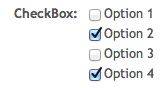
{
"Label":"CheckBox",
"FieldDataID":"chkboxID",
"Type":"checkbox",
"CbxValues": [
"Option 1",
"Option 2",
"Option 3",
"Option 4"
],
}
Notes:
- CbxValues are an array of options used for the displayed checkboxes.
- FieldDataID must be unique for each field on form
- "required" value is 1 if you require this field. If this key-value pair is omitted, the field will not be required.
Radio Group/Buttons
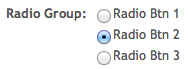
{
"Label":"Radio Group",
"FieldDataID":"radioGrpID",
"Type":"radio",
"Options": [
"Radio Btn 1",
"Radio Btn 2",
"Radio Btn 3"
],
"Checked":"Radio Btn 2",
"required" : 1
}
Notes:
- Options are an array of options used for the displayed radio buttons.
- The Checked value (optional) is the selected radio button and must be one of the options.
- FieldDataID must be unique for each field on form
- "required" value is 1 if you require this field. If this key-value pair is omitted, the field will not be required.
Selection List
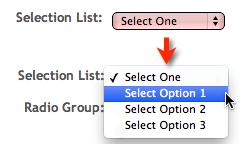
{
"Label":"Selection List",
"FieldDataID":"SelListFldID",
"Type":"select",
"OptionStart":"Select One",
"Options": [
"Select Option 1",
"Select Option 2",
"Select Option 3"
],
"required" : 1
}
Notes:
- The value for OptionStart is the text that is displayed on the selection list and if left, will be considered a null entry and will fail the required test. This should NOT be one of the options.
- Options are an array of options used for the selection list.
- FieldDataID must be unique for each field on form
- "required" value is 1 if you require this field. If this key-value pair is omitted, the field will not be required.
Number

{
"Label":"Number Field",
"FieldDataID":"numberFldID",
"width": 75,
"Type":"number",
"max" : 10,
"min" : 1,
"Placeholder": "(1-10)",
"Pattern":"[1-9]|10",
"required" : 1
}
Notes:
- width is in pixels
- If max and min are omitted, the field will take any integer
- The Pattern RegEx value must be entered for Internet Explorer and FireFox support. (Safari does not support validation on number fields, nor the Pattern attribute). If no pattern is required, omit the Pattern key value pair.
- FieldDataID must be unique for each field on form
- "required" value is 1 if you require this field. If this key-value pair is omitted, the field will not be required.

{
"Label":"Email Field",
"FieldDataID":"emailFldID",
"width": 250,
"Type":"email",
"Placeholder": "Valid email address",
"required" : 1
}
Notes:
- width is in pixels
- You might consider a RegEx expression in a Pattern field for better match criteria for supported browsers. This would require adding the optional "Pattern":"some regex", key value pair to the JSON object. If no pattern is required, omit the Pattern key value pair.
- FieldDataID must be unique for each field on form
- "required" value is 1 if you require this field. If this key-value pair is omitted, the field will not be required.
URL

{
"Label":"URL Field",
"FieldDataID":"URLFldID",
"width": 250,
"Type":"url",
"Placeholder": "Begin with http:// or https://",
"Pattern":"https?://.+",
"required" : 1
}
Notes:
- width is in pixels
- You might consider a RegEx expression in a Pattern field for better match criteria for supported browsers. This would require adding the optional "Pattern":"some regex",. If no pattern is required, omit the Pattern key value pair.
- FieldDataID must be unique for each field on form
- "required" value is 1 if you require this field. If this key-value pair is omitted, the field will not be required.
Date
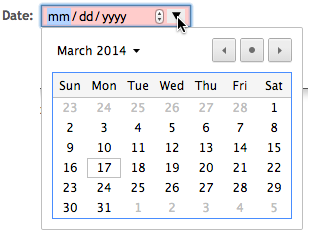
{
"Label":"Date",
"FieldDataID":"dateID",
"width":150,
"Type":"date",
"Placeholder": "mm/dd/yyyy",
"Pattern" : "(0[1-9]|1[012])[- /.](0[1-9]|[12][0-9]|3[01])[- /.](19|20)\\d\\d",
"required": 1
}
Notes:
- width is in in pixels
- FieldDataID must be unique for each field on form
- You might consider a RegEx expression in the Pattern field for better match criteria for supported browsers. This would require adding the optional "Pattern":"some regex", key value pair to the JSON object. If no pattern is required, omit the Pattern key-value pair.
- "required" value is 1 if you require this field. If this key-value pair is omitted, the field will not be required.